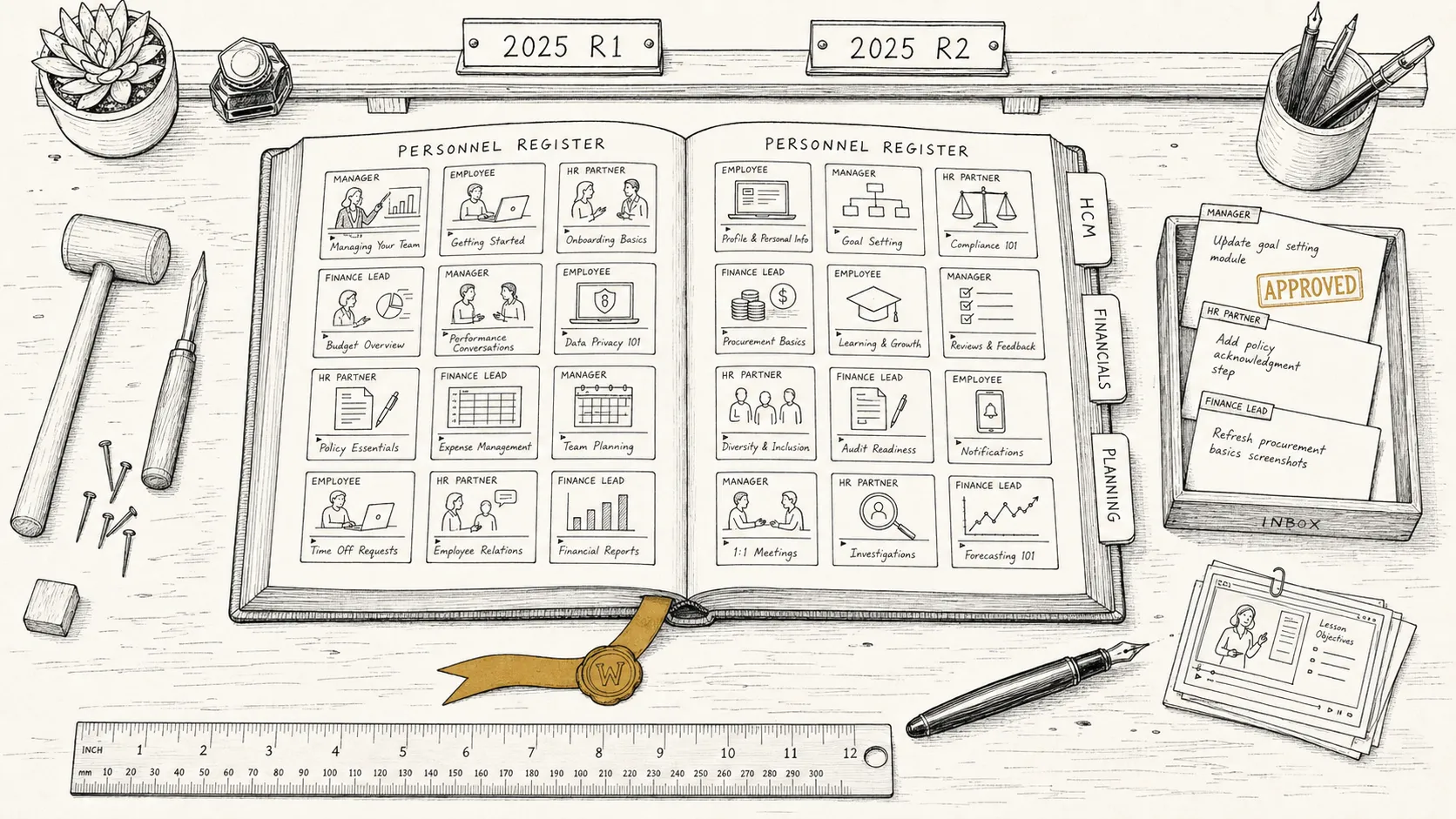
Workday training videos for the workflows your team actually runs.
Workday is task-driven. Every transaction routes through an inbox, often spanning days, involving an initiator, an approver, and a downstream reviewer who all see different screens. The library worth building is the one scoped to those role-specific tasks — not a single walkthrough that asks every viewer to sit through parts that do not apply.
Platform
Workday — HCM + Financials
Products
HCM · FINS · Planning · Extend
Output
MP4 · captions · SCORM
See also
/capabilities
The inbox problem
Every Workday transaction lives in someone else's inbox.
Workday training that walks through a transaction end-to-end as if one person did it all is training that does not survive contact with how the platform actually works. Most workflows are split — an initiator submits, an approver reviews from their inbox days later, an HR partner or finance lead picks it up downstream. Each of those people sees different screens and needs different training. A single linear video forces every viewer to sit through the segments that do not apply to them, which is the fastest way to lose attention.
The fix is to record by role and by segment, not to record more. The library that holds up against Workday’s release cadence and its task-driven model is one scoped to specific role-by-role tasks: how a manager reviews a comp change, how an employee enrolls in benefits, how an HR partner approves an org change, how a finance lead works the supplier-account inbox.
For Workday specifically, that means scoping for:
Per-role workflows
Manager, employee, HR partner, finance lead, time approver, recruiter. Same transaction, different screens. Role-based scoping is the single biggest lever on completion rates, and it has to be designed in from the scoping document forward — not patched on after capture.
Per-segment workflows
A business process that spans an initiator, two approvers, and a downstream reviewer is four short videos linked together, not one long one. Each segment is captured against the audience that actually performs it, and the LMS sequence stitches them.
Two major releases plus weekly service updates
2025 R1 in March, 2025 R2 in September, plus weekly service updates that can quietly change behaviour. Volatile UI pieces sit in short re-recordable videos; stable narration usually survives.
Tenant configuration
Workday is heavily configured per customer — your business processes, your security groups, your custom fields, your organization structure. Generic Workday demo-tenant training is something the vendor already provides; the library that earns attention shows your configuration.
What you get
A finished library, packaged for Workday Learning or the LMS you already use.
A complete Workday training video library, scoped to your tenant and your audiences. Standard delivery includes:
Source MP4s
1080p H.264, broadcast-ready, with consistent overlay design across the library — cursor highlights, region focus, callouts. The visual language is consistent so the library reads as one product, not 30 separate recordings.
Captions and transcripts
WebVTT and SRT captions on every video, plus a plain-text transcript per module. Caption styling complies with WCAG 2.2 Level AA; caption files are versioned alongside the video so re-cuts stay in sync.
SCORM 1.2 and 2004
Both SCORM versions packaged on delivery — most enterprise LMS platforms accept either, but procurement reviews often spec one. Direct iframe embed and xAPI are available where the destination supports them.
Workday Learning packaging
For organizations distributing through Workday Learning, direct MP4 plus caption files plus the metadata Workday Learning expects are part of the deliverable. Output formats confirmed during discovery.
Library structure
A scoping document that maps your business processes to videos, organized by role and by product area (HCM, Financials, Planning). The structure is the artifact that prevents scope creep and gives the production team a stable target.
A typical Workday rollout library lands at 25–40 videos per product area, with total runtime of 60–120 minutes. Smaller engagements (a single business process, a single role-bundle) run 12–20 videos. Multi-product implementations split into sub-libraries so the catalog stays navigable.
Workday-specific scope
What we cover, and how scoping accounts for the platform.
Workday is a wide platform. Scoping decides which slice is on screen for which audience. The patterns that recur across engagements:
HCM
Employee onboarding, the worker profile, time off, time tracking, performance management, comp changes, talent reviews, life events. Heavy on role-split workflows — managers approve, employees initiate, HR partners review.
Financials
Supplier accounts, customer accounts, expense management, projects, journal entries, period-end. Different audience from HCM (AP/AR/finance ops vs. workforce) and usually scoped as its own sub-library.
Adaptive Planning
Workforce planning, financial planning, budgeting, forecasting models. Heavier on power-user workflows than employee-facing — typically a smaller, role-bundled sub-library aimed at FP&A teams.
Workday Extend and configured tenant
Custom apps, custom report writers, custom calculated fields, custom security domains. The library covers what your users actually touch, not the standard objects they never see.
Inbox and business-process workflows
My Tasks, delegations, Workday Inbox routing, business-process exception handling. Often scoped as a thin cross-cutting sub-library because every audience needs some version of it.
What is intentionally not in scope by default: Workday Fundamentals certification prep, vendor-published platform overviews, conceptual HCM or finance-domain explainers. Those are different artifacts, often already covered by Workday’s own learning content. The library is procedural and tenant-specific — it teaches a specific user how to do a specific task in your tenant.
How we work
From discovery to a library, in days.
The process is the same six phases used on every engagement, summarized here. The full version with timing and deliverables per phase lives on the homepage.
1 · Discovery
A 30-minute paid discovery call. We come back with a content outline, a timeline, and a fixed-fee SOW. You know the scope and cost before production starts.
2 · Access
Read access to an implementation or sandbox tenant, or production-with-redaction. Production runs against the interface; data stays in your environment.
3 · Capture
Footage recorded against your configuration. Sandbox tenant with synthetic worker and finance data, or production with redaction — whichever your security review approves.
4 · Narration and editing
Professional narration recorded against the captured footage. Consistent overlay design applied across the library.
5 · Packaging
MP4 + captions + transcripts + SCORM packages, plus Workday Learning packaging where in-platform delivery is in scope. Output formats locked during discovery.
6 · Handoff
Library delivered, source files retained on your side as part of the deliverable. Updates handled as separately scoped work.
The studio is new. Workday work is in progress; case studies will publish here as clients release them. For unredacted references during late-stage evaluation, write to hello@seismic-technologies.com.
Until those land, anonymized clips covering voiceover, captioning, screen-recording quality, and branded packaging are available under NDA during discovery. A public reel will appear on the homepage samples section as individual modules clear.
Common questions
Frequently asked, Workday-specific.
Platform-specific questions buyers ask between researching the category and starting a conversation. Category-level questions (cost ranges, runtime, AI avatars vs studio) are answered on the pillar guide.
How do you handle the Workday release cadence — 2025 R1, 2025 R2, and the weekly service updates?
Workday ships two major releases a year (R1 in March, R2 in September) plus weekly service updates that can quietly change behaviour. The library is scoped so the volatile pieces — anything tied to a specific business process configuration, a UI element that moved, or a feature flipped on by service update — sit in their own short videos that re-record cleanly. Stable narration about the underlying business workflow usually survives across releases. We can scope an R1/R2 refresh into the original engagement or treat refreshes as separately scoped work.
Do you cover both HCM and Financials, or do they need separate engagements?
Either pattern works, but for most enterprises a single mega-library mixing HCM and Financials produces something nobody completes — the audiences barely overlap. Managers and employees do not need the supplier-account workflow; AP clerks do not need the performance-review walkthrough. The pattern that works is one sub-library per product area (HCM, Financials, Planning, Extend), structured by audience, with a shared visual and narration style across the catalog. Scoping decides up-front which sub-libraries are in the engagement.
Can videos be role-based — managers, employees, HR partners, finance leads?
Workday is unusually role-driven — the same transaction looks materially different depending on whether you are the initiator, the approver, the reviewer, or the recipient. Mixing roles in one video forces every viewer to skip the parts that do not apply to them. Scoping by role (manager, employee, HR partner, finance lead, time approver, and so on) is the change that moves completion rates more than any other, and it has to be designed in from the scoping document forward — not patched on after capture.
How do you train on inboxes, approvals, and business processes when every transaction routes differently?
Workday's task-driven model means most workflows are split between an initiator action, one or more approver inboxes, and a final state — often spanning days in production. The library handles this by capturing each segment of the business process as its own short video, then linking them together in the LMS or in a guided sequence. Approver training is typically scoped as its own sub-library because the audience and the moment-of-need are distinct from the initiators.
Do you record in our implementation tenant, a sandbox, or production?
Whichever your security review approves. The most common path is an implementation or sandbox tenant seeded with synthetic worker, organization, and finance data that mirrors production configuration. For organizations where the sandbox does not reflect the real configuration closely enough, capture happens in production with frame-by-frame redaction of personal data, compensation amounts, and any fields your security review flags. We do not capture against generic Workday demo tenants — the screens have to match your configuration.
Do you package for Workday Learning, or for our external LMS?
Both. Standard delivery is MP4 + WebVTT/SRT captions + transcript + SCORM 1.2 and 2004 packages, which works for most external LMS platforms. xAPI is available where the destination supports it. For organizations distributing inside Workday Learning, direct MP4 plus caption files plus the LMS-friendly metadata Workday Learning expects are part of the deliverable. Packaging is confirmed during discovery so the output matches the platform you actually deliver through.
For background on the category itself — production approaches, scoping a library, what separates a watched video from one that sits in the LMS — see the software training videos guide. For other platform-specific landings, see Salesforce, ServiceNow, and SharePoint training videos.
Where Seismic fits
A boutique studio, not a Workday partner.
Seismic is a production studio, not a Workday implementation partner. We do not configure your business processes, build your custom security groups, or write your calculated fields. We produce the training video library that lands when the configuration is done — and refresh it when releases or service updates change the screens.
We capture in your tenant
Implementation, sandbox, or production-with-redaction, against your real configuration. Not a generic Workday demo-tenant library.
We scope by role and by segment
Inbox-driven workflows are split into role-specific videos that link together in the LMS. Initiators do not watch approver content; approvers do not watch initiator content.
We deliver turnkey
Scoping, scripting, capture, narration, editing, and LMS or Workday Learning packaging all included. You hand over access; we hand back a finished library.
Fixed-fee SOW
Discovery is paid and ends with a fixed-price SOW. No per-finished-minute billing.
If you’re rolling out Workday, or working with a library that no longer matches your tenant after a couple of releases, write to us.
Bring the tenant you need trained on. Leave with a scoped path.
Thirty-minute discovery call. We come back with a content outline, a timeline, and a fixed-fee SOW.