PG · SN · 01 / 26
§ 01 — The release problem
SEC 01 / 07
REV. MAY 26
Seismic/Platforms/ServiceNow
Platform — ServiceNow

ServiceNow training videos for the workflows your users actually run.

ServiceNow ships two named releases a year — Yokohama (March 2025), Zurich (September 2025) — plus quarterly functional patches. It supports only the current release and the one before it. Generic ITSM training your vendor provides; what fulfillers and agents need is a library built against your instance, refreshed against the cadence, not abandoned to it.
Platform
ServiceNow — Now Platform
Products
ITSM · HRSD · CSM · custom
Output
MP4 · captions · SCORM
See also
/capabilities
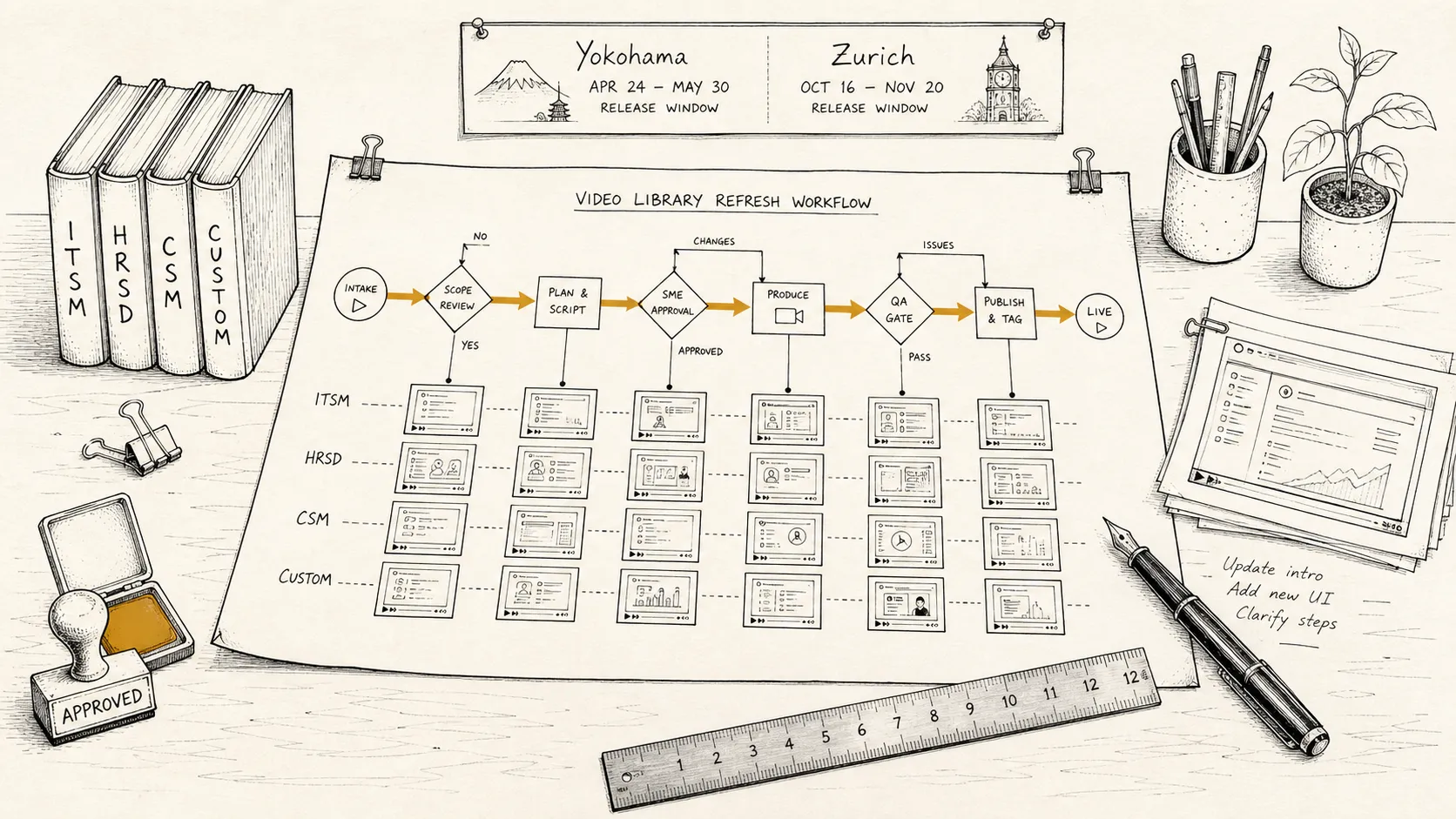
Illustration: an overhead view of a craftsperson's workbench laid out for a training-video library refresh — a large hand-drawn workflow diagram unfurled across the bench with branching paths and an ochre routing arrow, four small bound booklets along one edge with spines reading 'ITSM', 'HRSD', 'CSM', and 'CUSTOM', a wall-pinned almanac at the top showing two release windows labelled 'Yokohama' and 'Zurich', and an ochre-inked 'APPROVED' stamp resting on a stamp pad.
The release problem

A platform that updates around your library, twice a year.

Two named releases a year, plus quarterly functional patches landing in the first month of each calendar quarter. Each named release covers 50+ distinct product areas with their own change logs. ServiceNow supports only the current release and the one before it — once a third release goes GA, the oldest enters end-of-life with a 60-day grace period. Most training libraries are recorded once, then left. By the second named release, the screens no longer match and users route questions to the process owner instead.

Three specific examples of the training problem. In San Diego (2022), ServiceNow shipped Next Experience (Polaris), a complete redesign of the navigation paradigm with a new color palette — all pre-San Diego training materials showed a visually different product overnight. In Xanadu (August 2024), UI Builder moved to its own Store release track, meaning it can now update multiple times between named releases; the date/time picker was fully redesigned, and “Flow preferences” was renamed “User preferences” in Flow Designer. In Zurich (September 2025), Coral replaced Polaris as the default theme for new instances — visibly different colors, typography, and spacing. Libraries built on Polaris now show a different product than a new Zurich deployment.

Now Assist — ServiceNow’s GenAI layer, introduced in Vancouver (2023) — is the fastest-moving area on the platform right now. It is embedded throughout ITSM, CSM, HRSD, and Flow Designer as sidebar panels, compose prompts, and context menus. Every release since Vancouver has expanded it materially. Any workflow that touches Now Assist is the first to show its age.

The solution is not to record more — it’s to isolate volatile pieces into short, individually re-recordable videos. Narration about the underlying business process usually survives a release intact. The library ages a video at a time, not all at once.

For ServiceNow specifically, that means scoping for:

Per-role workflows
Agent, fulfiller, approver, requester, admin. The same record looks materially different in Agent Workspace than it does in Service Portal — and a requester should not have to watch the agent's workflow to learn how to submit a ticket.
Workspace versus classic UI
Many enterprises run Agent Workspace alongside the classic platform UI for legacy workflows. For those, the dual-version treatment lands on the workflows that actually differ, not the whole library.
Custom apps, tables, and record producers
A generic out-of-the-box library is something your vendor already provides. The library that earns attention documents your custom workflow on your custom table, against your record producer.
Permission-set and role-based variants
The same screen shows different fields and different buttons depending on which roles are assigned. Scoping accounts for the variants users actually encounter.
What you get

A finished library, packaged the way help is delivered inside ServiceNow.

A complete ServiceNow training video library, scoped to your instance and your audiences. Standard delivery includes:

Source MP4s
1080p H.264, broadcast-ready, with consistent overlay design across the library — cursor highlights, region focus, callouts. The visual language is consistent so the library reads as one product, not 30 separate recordings.
Captions and transcripts
WebVTT and SRT captions on every video, plus a plain-text transcript per module. Caption styling complies with WCAG 2.2 Level AA; caption files are versioned alongside the video so re-cuts stay in sync.
SCORM 1.2 and 2004
Both SCORM versions packaged on delivery — most enterprise LMS platforms accept either, but procurement reviews often spec one. Direct iframe embed and xAPI are available where the destination supports them.
In-platform delivery
For organizations distributing inside ServiceNow — Now Learning, embedded video on Service Portal, contextual help on a record producer — direct MP4 plus caption files and iframe-friendly hosting handle the integration.
Library structure
A scoping document that maps your tasks to videos, organized by role and product line. The structure is the artifact that prevents scope creep and gives the production team a stable target.

A typical ServiceNow rollout library lands at 25–40 videos per product line, with total runtime of 60–120 minutes. Smaller engagements (a single custom app, a single fulfillment team) run 12–20 videos. Multi-product rollouts split into sub-libraries per product so the catalog stays navigable.

ServiceNow-specific scope

What we cover, and how scoping accounts for the platform.

ServiceNow is a wide platform. Scoping decides which slice of it is on screen for which audience. The patterns that recur across engagements, ordered roughly by release volatility:

UI Builder and Flow Designer
The two highest-churn areas on the platform. UI Builder has shipped on its own Store release track since Xanadu — it can update between named releases, independent of the main upgrade cycle. Flow Designer receives significant functional and UI changes every named release (Washington added a full diagramming view; Xanadu renamed core elements and added role-based access controls that change visible UI). Both are always scoped for individual re-recording.
Now Assist (GenAI features)
The fastest-moving area since its introduction in Vancouver (2023). Now Assist is embedded throughout ITSM, CSM, HRSD, and Flow Designer as sidebars, compose prompts, and context panels. Every named release since Vancouver has materially expanded it. Any workflow that surface Now Assist is the first to go stale.
ITSM
Incident, problem, change, request fulfillment. Different roles see different consoles — agents work in Workspaces, requesters in Service Portal or Employee Center. Approval workflows usually warrant their own short videos because the audience and the moment-of-need are distinct.
HRSD
Employee Center, HR cases, lifecycle events, knowledge articles. Employee Center receives both named-release updates and mid-cycle quarterly Store enhancements — navigation was redesigned in Zurich with a simplified side nav replacing the mega menu. Most users encounter HR workflows only a few times a year, so the library has to be findable when they do.
CSM
Customer Service Workspace, case management, account hierarchies, omni-channel routing. Agent Workspace email compose was redesigned in Xanadu; lazy loading became default in Zurich. Often paired with custom integrations and external-portal training, both of which scope into the library.
Custom apps and Studio-built workflows
Industry-specific apps and internally built workflows on the Now Platform. The library covers what your users actually touch, not the standard tables they never see.

What is intentionally not in scope by default: ServiceNow Fundamentals certification prep, vendor-published platform overviews, conceptual ITIL or HRSD framework explainers. Those are different artifacts, often already produced. The library is procedural — it teaches a specific user how to do a specific task in your instance.

How we work

From discovery to a library, in days.

The process is the same six phases used on every engagement, summarized here. The full version with timing and deliverables per phase lives on the homepage.

1 · Discovery
A 30-minute paid discovery call. We come back with a content outline, a timeline, and a fixed-fee SOW. You know the scope and cost before production starts.
2 · Access
Read access to a dev or test instance, or a VM inside your environment that we connect to via your preferred remote-access method. Production runs against the interface; data stays in your environment.
3 · Capture
Footage recorded against your configuration. Dev instance with synthetic data, or production with redaction — whichever your security review approves.
4 · Narration and editing
Professional narration recorded against the captured footage. Consistent overlay design applied across the library.
5 · Packaging
MP4 + captions + transcripts + SCORM packages, plus in-platform delivery files where Now Learning or Service Portal embed is in scope. Output formats locked during discovery.
6 · Handoff
Library delivered, source files retained on your side as part of the deliverable. Updates handled as separately scoped work.

Full phase detail with timing on the homepage.

Sample & proof

Case studies, coming soon.

The studio is new. ServiceNow work is in progress; case studies will land here once clients sign off. For unredacted references during late-stage evaluation, write to hello@seismic-technologies.com.

In the meantime, anonymized clips covering voiceover, captioning, screen-recording quality, and branded packaging are available under NDA during discovery. A public reel goes up on the homepage samples section module by module, as each one clears.

Common questions

Frequently asked, ServiceNow-specific.

Platform-specific questions buyers ask between researching the category and starting a conversation. Category-level questions (cost ranges, runtime, AI avatars vs studio) are answered on the pillar guide.

How do you handle the Now Platform release cadence — Vancouver, Washington, Yokohama, Zurich?
Two named releases a year — Yokohama went GA in March 2025, Zurich in September 2025 — plus quarterly functional patches in the first month of each calendar quarter. ServiceNow supports only the current release and the one before it; the version two releases back enters end-of-life with a 60-day grace period. We scope the library so volatile pieces — UI Builder pages (which ship on their own Store track since Xanadu), Flow Designer screens, Now Assist panels, Workspace layouts — sit in their own short videos that re-record cleanly. Stable narration about the underlying business process usually survives a named release intact. A refresh can be scoped into the original engagement or handled as separately scoped work.
Can you cover ITSM, HRSD, CSM, and custom apps in one library?
Yes, but for most enterprises a single mega-library mixing ITSM, HRSD, and CSM produces something nobody completes — the audiences are different, the workflows are different, and the role definitions are different. The pattern that works is one sub-library per product line (or per custom app), structured by audience, with a shared visual and narration style across all of them so the catalog reads as one product. Scoping decides up-front which sub-libraries are in this engagement.
Do you record the agent workspace separately from the requester portal and Service Portal?
Always. Agents working in Agent Workspace or the Service Operations Workspace see materially different screens than requesters submitting through Service Portal or the Employee Center. Mixing them in one video forces every viewer to skip half of it. Splitting the library by role — agent, requester, fulfiller, approver, admin — is what moves completion rates the most.
Can you train on custom apps and tables built on the platform, not just the out-of-the-box products?
That is most of the work. Out-of-the-box ITSM training is a category your vendor or a video catalog already covers. The library that earns its keep is the one that documents your custom app, your custom table, your custom workflow, your custom approval chain. Capture happens in your dev or test instance against the configuration your users actually touch.
How do you capture screens without exposing real ticket data, employee records, or customer information?
Whichever your security review approves. The default path is a dev or test instance seeded with synthetic records that mirror production schema — that's where most ServiceNow capture happens. When the test instance is too thin to teach the workflow honestly, capture moves to production with frame-by-frame redaction of names, account numbers, contact information, and any fields your security review flags.
Do you package for ServiceNow University / Now Learning or our external LMS?
Both. Standard delivery is MP4 + WebVTT/SRT captions + transcript + SCORM 1.2 and 2004 packages, which works for most external LMS platforms. xAPI is available where the destination supports it. For organizations distributing inside ServiceNow itself — ServiceNow University (rebranded from Now Learning at Knowledge 2025), embedded video in Service Portal, contextual help on a record producer — direct MP4 + caption files plus iframe-friendly hosting handle the integration. Packaging is confirmed during discovery so the output matches the platform you actually deliver through.

For background on the category itself — production approaches, scoping a library, what separates a watched video from one that sits in the LMS — see the software training videos guide. For another platform-specific landing, see Salesforce training videos.

Where Seismic fits

A boutique studio, not a ServiceNow partner.

Seismic is a production studio, not a ServiceNow implementation partner. We do not configure your instance, build your custom apps, or write your Flow Designer logic. We produce the training video library that lands when the configuration is done — and refresh it when releases break the screens.

ServiceNow University (rebranded from Now Learning at Knowledge 2025) serves nearly 2 million learners and covers the platform at a general level — CSA exam prep, Flow Designer fundamentals, ITSM concepts. It does not cover your custom apps, your record producers, your org-specific approval chains, or the configuration choices your implementation team made. That is what a library built against your instance covers.

The n-1 support model adds a deadline. ServiceNow supports only the current release and the one before it. Once a third named release goes GA, the oldest enters end-of-life with a 60-day grace period. A library that is two named releases out of date is not just stale — it may be documenting a configuration on an unsupported version.

We capture in your instance
Dev or test with synthetic data, or production-with-redaction, against your real configuration. Not a generic out-of-the-box library.
We scope to the release cadence
The library is structured so volatile pieces (UI Builder pages, Flow Designer screens, Now Assist panels, Workspace layouts) re-record individually. You don't pay to rebuild the whole library every named release.
We deliver turnkey
Scoping, scripting, capture, narration, editing, and LMS or in-platform packaging all included. You hand over access; we hand back a finished library.
Fixed-fee SOW
Discovery is paid and ends with a fixed-price SOW. No per-finished-minute billing.

If you’re rolling out ServiceNow, or wrestling with a library that’s two named releases out of date, that’s the kind of work we take.

Bring the instance you need trained on. Leave with a scoped path.

Thirty-minute discovery call. We come back with a content outline, a timeline, and a fixed-fee SOW.
Book a discovery call